1. Product Overview
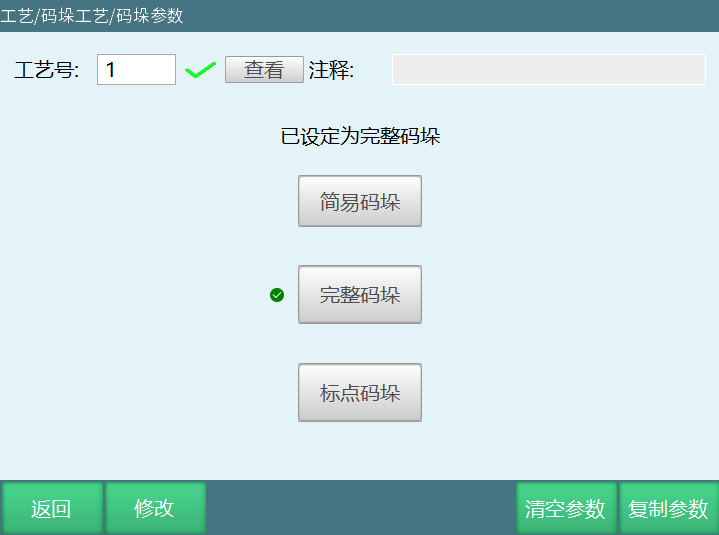
The iNexBot general-purpose palletizing solution serves palletizing scenarios across chemicals, food, beverages, pharmaceuticals, feed, grain, machining, logistics, and other industries, offering three palletizing modes: Simple Palletizing, Full Palletizing, and Point-Marked Palletizing.
The three modes cover the full spectrum from simple regular patterns and complex interlocking patterns to special point-based placement, helping users achieve the most reliable palletizing results at the lowest setup cost.
2. Model Selection
Common Pallet Patterns
| Pattern | Structural Features | Typical Materials | Supported iNexBot Modes |
|---|---|---|---|
| Row-and-Column | Each layer arranged in fixed rows and columns, perfectly aligned with the layers above and below. Simple structure, suitable for rigid cartons. | Rigid cartons, plastic totes, regular parts bins | Simple Palletizing, Full Palletizing |
| Interlocking (90° Cross) | Adjacent layers rotated 90°, with the upper layer covering the gaps of the lower one for greater stability. | Rectangular beverage cartons, water bottle cases, long cartons | Full Palletizing |
| Multi-Stack (Five-Spot) | A single layer divided into multiple zones with different row/column orientations or counts; layers interlock over gaps like a brick wall. | Soft bags such as fertilizer, feed, and grain bags, long cartons | Full Palletizing |
| Rectangular-Ring | Items arranged in a ring-like pattern with the center left open or filled with other materials; ideal for long objects. | Long cartons, elongated parts packs, profile bundles | Full Palletizing |
| Custom | Position, angle, and orientation of each item defined according to material shape, pallet size, or shipping requirements. | Irregular workpieces, display stacks, mixed-load pallets | Full Palletizing, Point-Marked Palletizing |
Selection Guide
- Single-layer placement or simple aligned stacks → Simple Palletizing
- Complex patterns requiring gap interlocking, rotation, multi-stack, or rectangular-ring layouts → Full Palletizing
- Irregular place points requiring point-by-point definition → Point-Marked Palletizing
3. The Three Palletizing Modes
3.1 Simple Palletizing
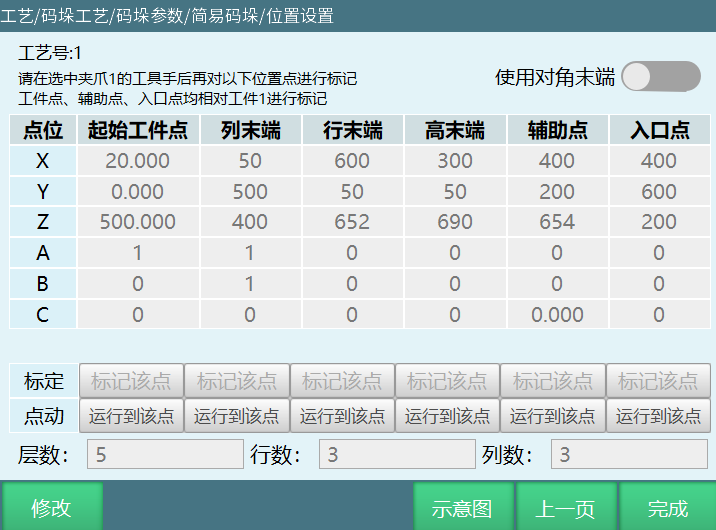
Best for: simple patterns where items are stable when placed in a regular arrangement.
Simple Palletizing is a lightweight mode for "single-layer placement" or "simple, regular multi-layer stacks". Just configure the gripper parameters and teach the workpiece point, column end, row end, height end, auxiliary point, and entry point — the system automatically generates the complete palletizing job.
- Minimal configuration: typically only 6 reference points need to be calibrated
- Zero-code operation: flowchart-style interface that any ordinary operator can learn
- Fast file generation: one click creates the job file once basic settings are done
- Suitable patterns: regular row-and-column stacks, single-layer slot trays, and simple aligned multi-layer stacks
Typical scenarios: placing machined parts into tray slots, single-layer arrangement of machine-unloaded parts, and single-layer stacking of regular cartons.
3.2 Full Palletizing
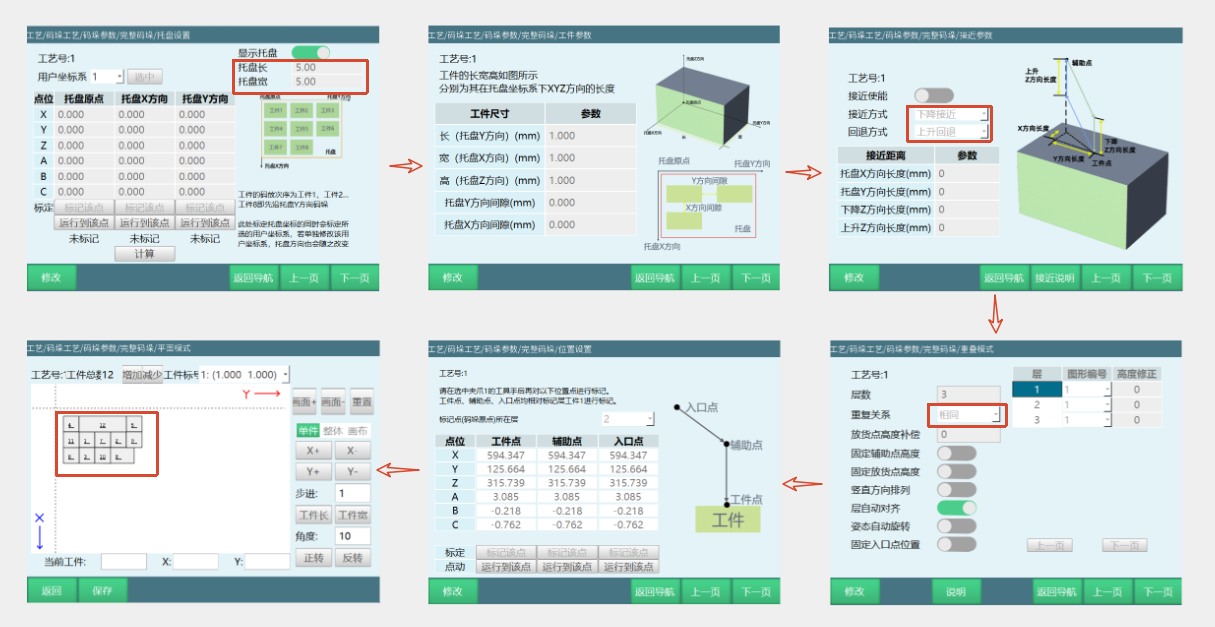
Best for: complex patterns that require gap interlocking, rotation, and staggering to maintain stability.
Full Palletizing is the full-featured mode for complex patterns. The system comes with common built-in patterns — row-and-column, interlocking cross, rectangular-ring, and multi-stack — and also supports custom drag-and-drop pattern design, covering the vast majority of industrial palletizing scenarios.
- Row-and-column: regular arrays, ideal for simple multi-layer stacking of rigid cartons
- Interlocking cross: adjacent layers rotated 90° over gaps, ideal for rectangular beverage cartons, water bottle cases, and long cartons
- Rectangular-ring: ring-shaped layout, ideal for long cartons, elongated packaging, and profile bundles
- Multi-stack: multi-zone offset layouts plus inter-layer gap coverage, ideal for soft bags such as fertilizer, feed, and grain bags
- Custom patterns: drag-and-drop setup, ideal for irregular workpieces, mixed-load pallets, and special display stacks
- Approach parameters and pallet settings: configurable approach/retract modes and pallet origin and orientation to avoid collisions
- Multi-gripper support: up to four grippers that can be switched or used simultaneously
- Position commissioning: the interface displays the exact coordinates of every stack position; selecting one moves the robot there automatically
- Guided setup: clear step-by-step workflow with no programming required
Typical scenarios: rotated interlocking palletizing of beverage/water cases, multi-stack palletizing of fertilizer/feed bags, rectangular-ring palletizing of long cartons, and mixed stacking of multi-specification cartons.
3.3 Point-Marked Palletizing
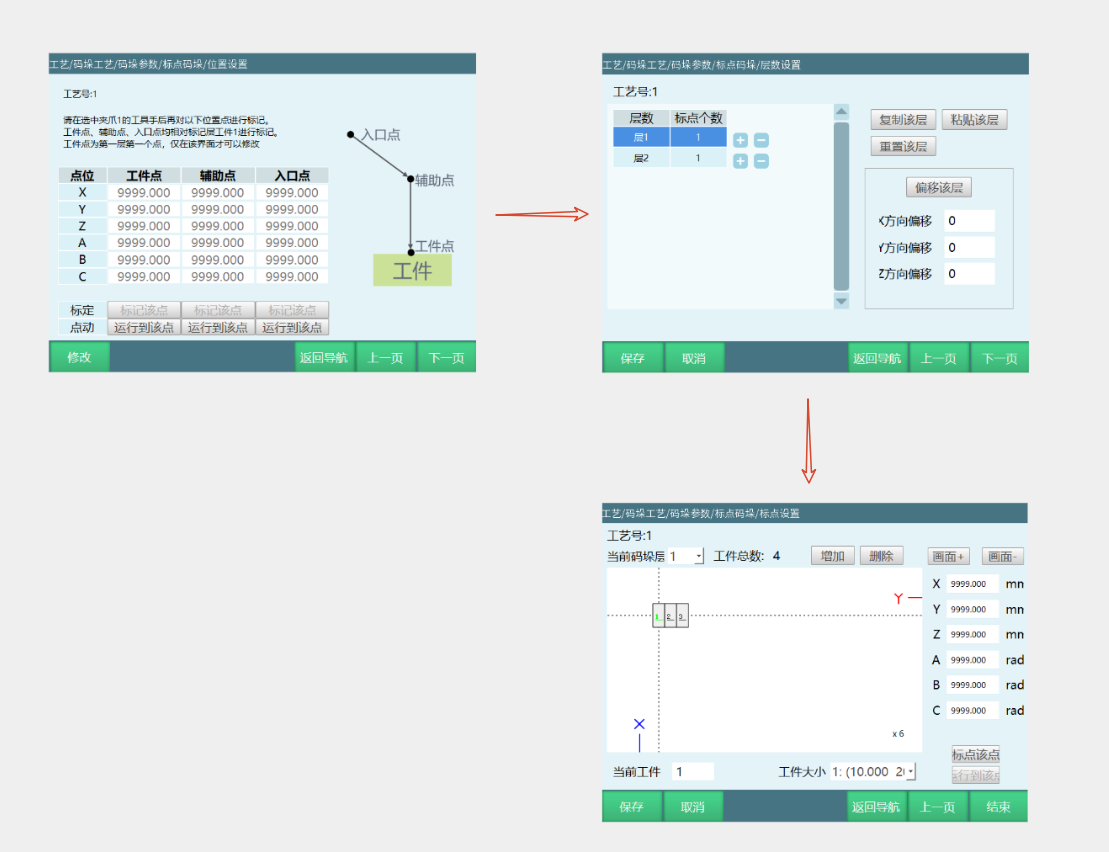
Best for: place points that cannot be described by a regular pattern and must be defined precisely point by point.
Point-Marked Palletizing is a point-by-point teach mode for non-standard placements. The user records the exact coordinates of each place point with the teach pendant, and the system executes palletizing in point order, enabling fully customized stacking layouts.
- Point-by-point calibration: record each place point coordinate with the teach pendant, accurate to the millimeter
- Free ordering: the execution order of points can be freely adjusted, supporting irregular arrangements and skip-stacking
- Mixed single/multi points: special marked points can be inserted into standard patterns
- Visual point management: the interface displays all marked points and supports editing and deletion
Typical scenarios: point-by-point placement of irregular workpieces into rack slots, promotional display stacks, trial production of new products, and high-precision positioning applications.
4. Mode Comparison
| Aspect | Simple Palletizing | Full Palletizing | Point-Marked Palletizing |
|---|---|---|---|
| Selection basis | Simple regular patterns / stable with single-layer placement | Complex patterns / require interlocking for stability | Irregular place points / need point-by-point definition |
| Achievable patterns | Regular row-and-column stacks, single-layer slot trays | Row-and-column, interlocking cross, rectangular-ring, multi-stack, custom | Any custom point layout |
| Configuration complexity | Minimal — calibrate 6 reference points | Moderate — guided setup | Low — point-by-point teaching |
| Approach parameters / pallet settings | None | Yes — approach, retract, pallet origin and orientation | None |
| Programming required | No | No | No |
| Multi-gripper support | Yes | Yes | Yes |
5. Product Advantages
- Pick the right mode for the pattern — no detours
- Minimal-effort operation, ready out of the box
- Drag-and-drop visualization — no more guessing coordinates
- Multi-gripper coordination for multiplied efficiency
- One-click import/export for batch replication
6. Common Application Scenarios
- ✅ Loading/unloading palletizing: interfaces with line loading/unloading to grab incoming parts and complete stacking
- ✅ Post-stamping palletizing: after the stamping process, grabs stamped parts for stacking
- ✅ Lens polishing palletizing: after the polishing process, completes workpiece outfeed stacking
- 💡 Tip: for standardized materials such as packaged goods and grain & oil, prefer the industry-specific palletizing solutions; when facing coupled processes or non-standard, variable conditions like those above, use the General-Purpose Palletizing function.
7. FAQ
Q1: What is the difference between this system and your dedicated systems such as chemical depalletizing and barrel palletizing?
Dedicated systems are deeply customized for a specific industry and suit high-volume, single-category production. General-Purpose Palletizing targets multi-variety, small-to-medium batch scenarios: the three modes switch flexibly, and one system covers machining, stamping, food, feed, and many other industries at a lower investment cost.
Q2: What hardware is needed to deploy General-Purpose Palletizing?
Just the robot, controller, teach pendant, and gripper/tooling. The system is integrated directly into the teach pendant — no extra host PC or industrial PC is needed, and a software upgrade enables it.
Q3: We need to connect to our existing MES and PLC. Is that supported?
Yes. Connect to PLCs and MES via EtherCAT, PROFINET, EtherNet/IP, Modbus TCP, and other protocols, or use hardwired I/O for start/stop and alarm signal exchange.
Q4: How long does operator training take? Is daily maintenance complicated?
Half a day of training is enough to operate independently. With its flowchart-style, zero-code interface, daily work only involves switching products and importing configuration files — no on-site programming specialists required.
Q5: How long does a changeover take? Can configurations be saved?
Yes — multiple process-numbered products can be set up for fast changeovers, and all product configurations can be batch-copied to identical lines.
Q6: How is after-sales and technical support provided?
Dual-channel support combining remote consultation and on-site service. Routine issues get immediate remote response; on-site support is arranged quickly depending on the region. You can also contact iNexBot technical support for model selection advice and on-site assessment.