The continuous motion mode in host computer secondary development is a motion mode that frees you from instruction-based operation — you can control the robot directly for continuous motion without a job program.
Environment Setup
Create a new project
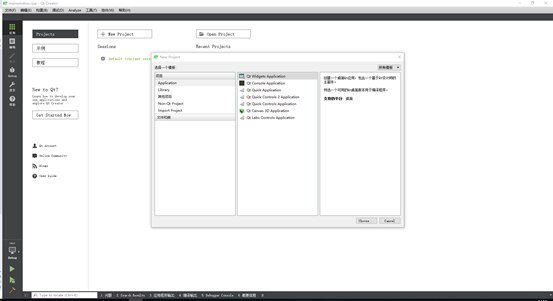
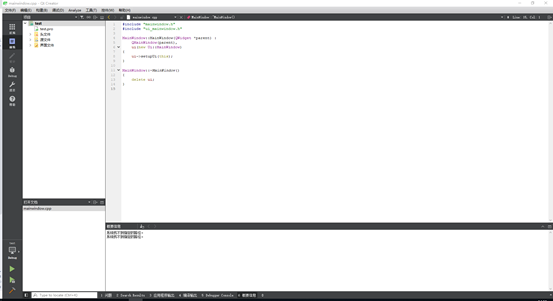
The project is created
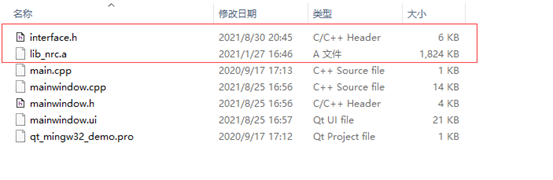
Place the library file lib_nrc.a and the interface.h file downloaded from the official website into the project directory
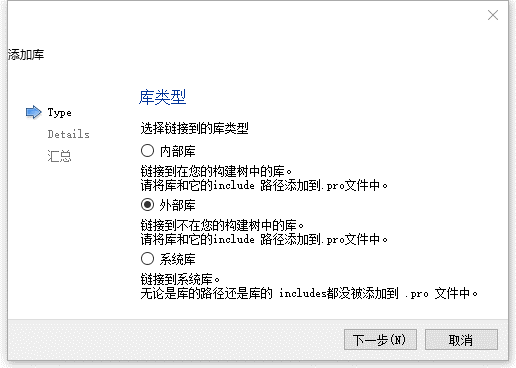
Right-click the project and select Add Library
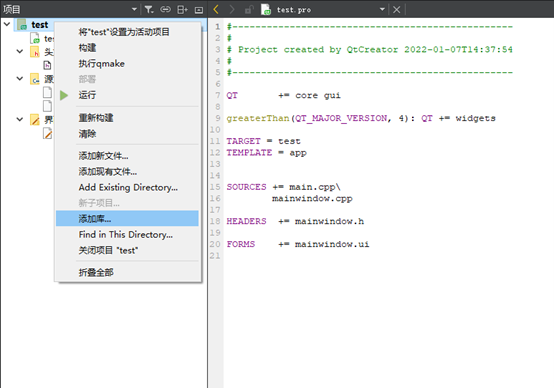
Select External Library
Select the library file you just placed in the same directory, then check Windows and Static
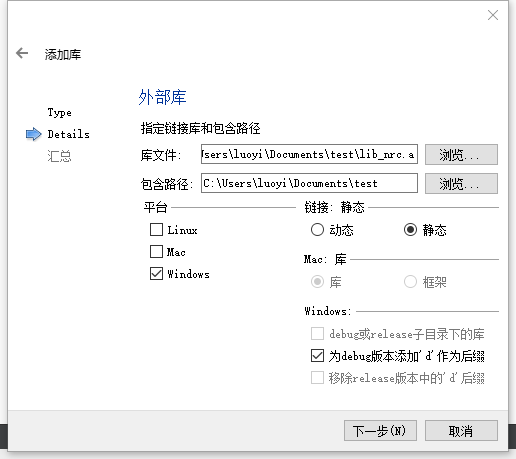
Click Finish — the static library has been added
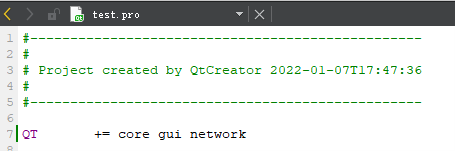
If the .pro file does not contain network, add it manually
Development
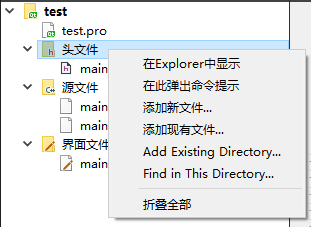
Right-click the header files, select Add Existing Files, choose interface.h, and click Open
Add #include \"interface.h\" in mainwindow.cpp
#include "mainwindow.h"
#include "ui_mainwindow.h"
#include "interface.h"
Add three buttons to the UI
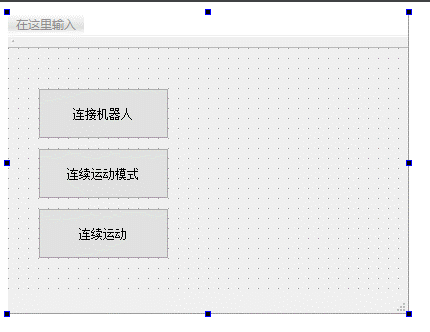
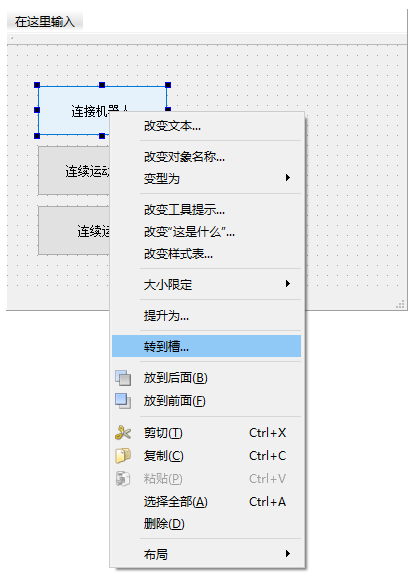
Right-click each button and select Go to Slot
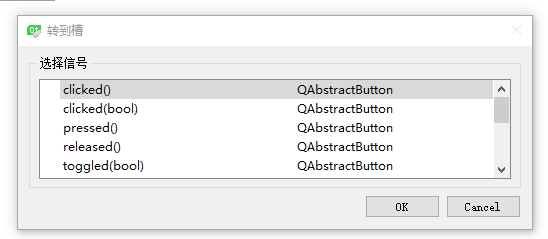
Select the clicked() signal and click OK
Add the robot connection interface to the slot function of the first button
void MainWindow::on_pushButton_clicked()
{
char ip[100] = "192.168.1.13";
if(connect_robot(ip))
{
    qDebug()<<"Connection successful";
}
else
{
    qDebug()<<"Connection failed";
}
}
Use the connect_robot(char \*ip) interface, entering the IP address of the controller to connect to
Continuous Motion Mode
Add the continuous motion mode enable interface to the slot function of the second button
void MainWindow::on_pushButton_2_clicked()
{
if(get_current_mode() != 2)
{
    set_current_mode(2);
}
continuous_motion_mode(1);
}
Use the get_current_mode() interface
to check whether the current mode is run mode; if not, use the set_current_mode(2) interface
to switch to run mode
Use the continuous_motion_mode(1) interface to enable continuous motion mode
get_current_mode() retrieves the current mode. Return values: 0 — teach mode, 1 — remote mode, 2 — run mode
set_current_mode(int num) sets the current mode. 0 — teach mode, 1 — remote mode, 2 — run mode
continuous_motion_mode(int num) sets continuous motion mode. 0 — off, 1 — on
Add the continuous motion command queue to the slot function of the third button
void MainWindow::on_pushButton_3_clicked()
{
//The following points are for testing only — use with caution!
cmdPara cmd[6];

cmd[0].cmdType = cmdPara::MOVJ;
cmd[0].m_velocity = 30;
cmd[0].m_acc = 30;
cmd[0].m_dec = 30;
cmd[0].m_pl = 0;

cmd[0].m_coord[0] = 0;
cmd[0].m_coord[1] = 0;
cmd[0].m_coord[2] = 0;
cmd[0].m_coord[3] = 0;
cmd[0].m_coord[4] = 0;
cmd[0].m_coord[5] = 0;
cmd[0].m_coord[6] = 0;

cmd[0].m_position[0] = 0;
cmd[0].m_position[1] = 0;
cmd[0].m_position[2] = 0;
cmd[0].m_position[3] = 0;
cmd[0].m_position[4] = 0;
cmd[0].m_position[5] = 0;


cmd[1].cmdType = cmdPara::MOVL;
cmd[1].m_velocity = 300;
cmd[1].m_acc = 30;
cmd[1].m_dec = 30;
cmd[1].m_pl = 0;

cmd[1].m_coord[0] = 0;
cmd[1].m_coord[1] = 0;
cmd[1].m_coord[2] = 0;
cmd[1].m_coord[3] = 0;
cmd[1].m_coord[4] = 0;
cmd[1].m_coord[5] = 0;
cmd[1].m_coord[6] = 0;

cmd[1].m_position[0] = 10;
cmd[1].m_position[1] = 10;
cmd[1].m_position[2] = 10;
cmd[1].m_position[3] = 10;
cmd[1].m_position[4] = 10;
cmd[1].m_position[5] = 10;


cmd[2].cmdType = cmdPara::MOVC;
cmd[2].m_velocity = 300;
cmd[2].m_acc = 30;
cmd[2].m_dec = 30;
cmd[2].m_pl = 0;

cmd[2].m_coord[0] = 0;
cmd[2].m_coord[1] = 0;
cmd[2].m_coord[2] = 0;
cmd[2].m_coord[3] = 0;
cmd[2].m_coord[4] = 0;
cmd[2].m_coord[5] = 0;
cmd[2].m_coord[6] = 0;

cmd[2].m_position[0] = 20;
cmd[2].m_position[1] = 20;
cmd[2].m_position[2] = 0;
cmd[2].m_position[3] = 0;
cmd[2].m_position[4] = 0;
cmd[2].m_position[5] = 0;


cmd[3].cmdType = cmdPara::MOVC;
cmd[3].m_velocity = 300;
cmd[3].m_acc = 30;
cmd[3].m_dec = 30;
cmd[3].m_pl = 0;
cmd[3].m_spin = 0;

cmd[3].m_coord[0] = 0;
cmd[3].m_coord[1] = 0;
cmd[3].m_coord[2] = 0;
cmd[3].m_coord[3] = 0;
cmd[3].m_coord[4] = 0;
cmd[3].m_coord[5] = 0;
cmd[3].m_coord[6] = 0;

cmd[3].m_position[0] = 0;
cmd[3].m_position[1] = 0;
cmd[3].m_position[2] = 0;
cmd[3].m_position[3] = 0;
cmd[3].m_position[4] = 0;
cmd[3].m_position[5] = 0;


cmd[4].cmdType = cmdPara::MOVCA;
cmd[4].m_velocity = 300;
cmd[4].m_acc = 30;
cmd[4].m_dec = 30;
cmd[4].m_pl = 0;
cmd[4].m_spin = 0;

cmd[4].m_coord[0] = 0;
cmd[4].m_coord[1] = 0;
cmd[4].m_coord[2] = 0;
cmd[4].m_coord[3] = 0;
cmd[4].m_coord[4] = 0;
cmd[4].m_coord[5] = 0;
cmd[4].m_coord[6] = 0;

cmd[4].m_position[0] = 0;
cmd[4].m_position[1] = 5;
cmd[4].m_position[2] = 5;
cmd[4].m_position[3] = 5;
cmd[4].m_position[4] = 5;
cmd[4].m_position[5] = 5;


cmd[5].cmdType = cmdPara::MOVCA;
cmd[5].m_velocity = 300;
cmd[5].m_acc = 30;
cmd[5].m_dec = 30;
cmd[5].m_pl = 0;
cmd[5].m_spin = 0;

cmd[5].m_coord[0] = 0;
cmd[5].m_coord[1] = 0;
cmd[5].m_coord[2] = 0;
cmd[5].m_coord[3] = 0;
cmd[5].m_coord[4] = 0;
cmd[5].m_coord[5] = 0;
cmd[5].m_coord[6] = 0;

cmd[5].m_position[0] = 15;
cmd[5].m_position[1] = 15;
cmd[5].m_position[2] = 15;
cmd[5].m_position[3] = 15;
cmd[5].m_position[4] = 15;
cmd[5].m_position[5] = 15;

send_continuous_motion_queue(cmd,6);
}
Create the command queue structure array cmdPara cmd[6];
- The first command is joint motion with velocity 30%, acceleration 30, deceleration 30, smoothing 0, targeting joint coordinates (0, 0, 0, 0, 0, 0)
- The second is linear motion at 300 mm/s, acceleration 30, deceleration 30, smoothing 0, targeting joint coordinates (10, 10, 10, 10, 10, 10)
- The third and fourth commands are circular motion at 300 mm/s, acceleration 30, deceleration 30, smoothing 0, passing through joint coordinates (20, 20, 0, 0, 0, 0) and (0, 0, 0, 0, 0, 0)
- The fifth and sixth commands are full-circle motion at 300 mm/s, acceleration 30, deceleration 30, smoothing 0, passing through joint coordinates (0, 5, 5, 5, 5, 5) and (15, 15, 15, 15, 15, 15)
Command structure reference:
- MOVJ: joint motion
- MOVL: linear motion
- MOVC: circular motion
- MOVCA: full-circle motion
- MOVJEXT: joint motion with external axes
- MOVLEXT: linear motion with external axes
- MOVCEXT: circular motion with external axes
- double m_velocity: velocity. Joint motion velocity ranges from 1–100%; non-joint motion velocity ranges from 2–1000 mm/s
- double m_acc: acceleration, range 1–100
- double m_dec: deceleration, range 1–100
- double m_pl: smoothing, range 0–5
- int m_spin: posture (required only for MOVCA). 0 — posture unchanged, 1 — no rotation of the six axes, 2 — six axes rotate
- double m_coord[7]: positions 1 and 2 represent coordinates; position 3 is left/right arm (0 — none, 1 — left, 2 — right) / posture (0–8); position 4 is tool hand; position 5 is the coordinate system; positions 6 and 7 are reserved
- double m_position[7]: positions 1–7 represent the robot's target coordinates (supports up to seven-axis robots; fill unused positions with 0)
- double m_syncPosition[5]: positions 1–5 represent the external axis coordinates (supports up to five external axes; fill unused positions with 0)
Note:
Circular motion, full-circle motion, and circular motion with external axes must be used in pairs of two commands per group, otherwise they will not run.
To increase the speed in continuous motion mode, adjust the global speed within the current mode using the void set_jogging_speed(int speed); interface, where speed ranges from 0–100.
If the motion does not complete the configured target points as expected, possible causes include:
- The target position is unreachable
- The target position exceeds the limit for some axes
- Excessive speed triggers a servo error
- Errors in the program code
- Continuous motion mode is not enabled in run mode
- Servo status issue
It is recommended to test the target points with teach mode first to confirm they are reachable before setting them through host computer secondary development.